Want the next breakdown?
New workflows and prompts, as soon as I post them.
The email list opens soon. Follow along to get it first.
Follow @ima_ginationzNew workflows and prompts, as soon as I post them.
The email list opens soon. Follow along to get it first.
Follow @ima_ginationzOct 15, 2026 · 9 min read
A simple workflow for creating 10–15 second cozy anime food videos with strong hooks, consistent characters, clean food continuity, and fewer AI glitches. It's the exact process behind my Reels, including the four prompts I give ChatGPT.
I use ChatGPT as the creative director before I generate anything. I do all four steps in one chat, so it remembers the character from start to finish. Copy each prompt, then adjust the details to your own idea.
1 · Create your character
Start a new ChatGPT chat with this.
I would like to create 15-second cozy anime videos for Instagram Reels. Create a character for me.

Make it a character reference sheet:
- a large cinematic portrait
- front, side and back full-body views
- a color palette
- expressions: normal, happy, curious, sleepy
- a few poses doing everyday cozy things

Give the character one signature detail (a prop or pet) that can appear in every video so viewers recognize them.
A reference sheet with front, side and back views gives every later step something concrete to match. The signature detail matters more than it looks: a white mug with a tiny black cat, or my tuxedo cat, appears in every video, and viewers start recognizing the series by it.
2 · Get the video idea
In the same chat, once you like the character.
Give me an idea for the first video.
15 seconds, 9:16 vertical, no dialogue.
Open with a strong 1-2 second hook.
Break it into scenes with timestamps, and note any on-screen text and sound for each scene.
You'll get a short story split into scenes with timestamps, on-screen text and sound. If the opening is slow, ask ChatGPT for a stronger hook before moving on.
3 · Create the storyboard image
Once you like the idea.
I like the idea. Create a storyboard image for that video using the same character.
The storyboard should contain 8-12 shots which will be used as the reference image in Seedance 2.0.
Label each panel with a shot number and timecode only.
Keep the character's face, hair, outfit, the room and the props identical in every panel.
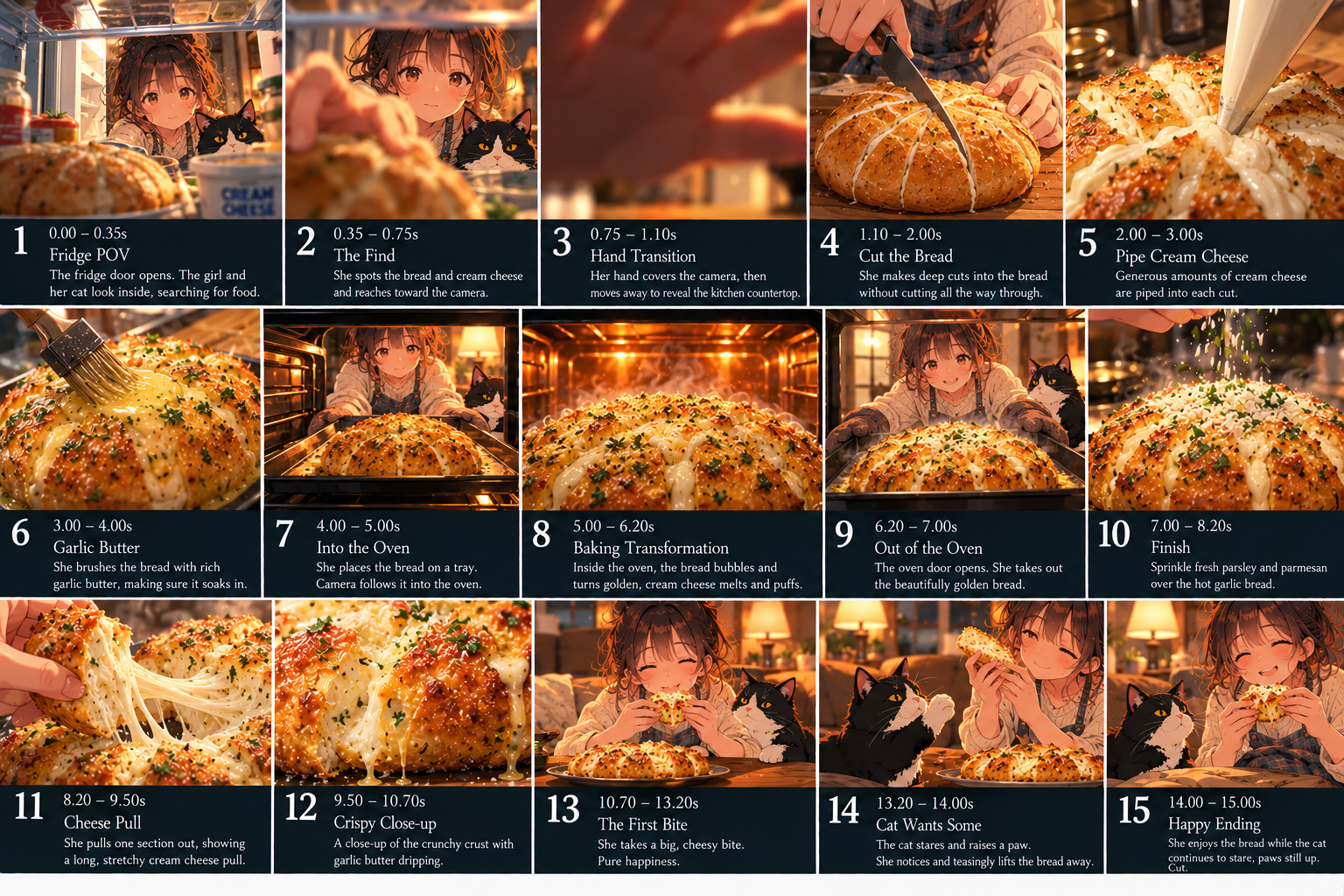
Check it before moving on. If a panel shows the finished dish too early, an extra hand, or the character in a different outfit, ask ChatGPT to fix that panel now. It's much cheaper than fixing it in the video.
4 · Write the Seedance 2.0 prompt
After the storyboard looks right.
Now give me a prompt that will guide Seedance 2.0 to generate the video from this storyboard. Keep it under 4,000 characters.
Use these sections: character consistency, visual style, shot sequence with timestamps, camera and transitions, audio, ending, and a final list of things to avoid.
Treat the storyboard as the primary visual reference.
No dialogue.
A good answer follows this structure. If something is missing, such as the continuity rules, ask ChatGPT to add it:
The prompt structure
What a good Seedance prompt from step 4 looks like. Fill in the brackets.
Create a 15-second vertical 9:16 cinematic cozy anime short titled "[TITLE]", following the attached storyboard as the visual guide.

CHARACTER CONSISTENCY: Keep the same [character: hair, eyes, outfit, personality] in every shot. Preserve facial features, hairstyle, outfit, body proportions and colors across all shots. [Signature detail, e.g. a white mug with a tiny black cat.]

VISUAL STYLE: Hand-painted anime aesthetic, cozy slice-of-life atmosphere, [lighting], soft shadows, detailed backgrounds, subtle film grain, [color palette]. Fluid motion and consistent anatomy.

SHOT SEQUENCE - 15 SECONDS TOTAL:
Shot 1 (0-1.5s): [Framing]. [One clear action]. [Camera move].
Shot 2 (1.5-3s): ...
[One shot per storyboard panel, 8-12 shots.]

CAMERA AND TRANSITIONS: Smooth, restrained movement, subtle push-ins, slow pans and natural cuts. Avoid abrupt transitions, excessive motion or fast editing.

AUDIO: [Music + ambient sounds, e.g. kitchen ASMR, rain, mug clink]. No dialogue or voice-over.

CONTINUITY: Same ingredient and portion throughout. One utensil at a time. Maximum two human hands visible. Do not show the finished dish before it is made.

ENDING: [Final shot. Exact on-screen text in quotes, or "no text".]

IMPORTANT: Follow the storyboard's sequence and preserve the character design. No extra characters, no costume changes, no distorted hands or faces, no duplicated limbs, food or props, no flickering, no watermarks and no unintended text.
Here's a full prompt ChatGPT wrote for a 9-shot morning-routine video, so you can see what "finished" looks like:
Worked example: “A Slow Morning in His Little World”
The exact prompt ChatGPT wrote for a 9-shot storyboard.
Create a 15-second vertical 9:16 cinematic cozy anime short titled "A Slow Morning in His Little World," following the attached storyboard as the visual guide.

CHARACTER CONSISTENCY: Keep the same young male anime character in every shot: messy dark brown hair, warm brown eyes, oversized dark olive-green hoodie, beige cargo pants, gentle expression, and relaxed personality. Preserve his facial features, hairstyle, outfit, body proportions, and colors across all shots. His signature white ceramic mug has a small black cat illustration.

VISUAL STYLE: Beautiful hand-painted anime aesthetic, cozy slice-of-life atmosphere, warm golden-hour sunlight, soft shadows, detailed backgrounds, subtle film grain, natural character movement, cinematic composition, and a muted palette of olive green, cream, amber, and sunset orange. Peaceful, nostalgic, comforting mood. High-quality animation with fluid motion and consistent anatomy.

SHOT SEQUENCE - 15 SECONDS TOTAL:

Shot 1 (0-1.5s): Medium shot. In his cozy bedroom, the boy wakes up, stretches gently, and rubs his sleepy eyes as morning sunlight enters through the window. Slow camera push-in.

Shot 2 (1.5-3s): Side-profile shot. He sits beside the window and quietly watches the sunrise over a peaceful town. Curtains sway gently in the breeze; dust particles float in the sunlight.

Shot 3 (3-4.5s): Close-up of his hands pouring hot water into his white cat mug. Steam rises naturally; warm sunlight glows on the wooden desk. Gentle pouring motion.

Shot 4 (4.5-6s): Close-up. He holds the steaming mug with both hands, takes a small sip, closes his eyes, and smiles softly. Cozy, intimate framing.

Shot 5 (6-7.5s): Medium shot. He sits at his desk, quietly studying or writing beside an open laptop. Subtle hand movements and a focused expression.

Shot 6 (7.5-9s): Close-up. Wearing black headphones, he closes his eyes and smiles as he enjoys his favorite music. Slight head sway, relaxed shoulders, warm light on his face.

Shot 7 (9-10.5s): Medium close-up. He lifts a small camera and takes a photograph of the beautiful view outside. Natural hand movement and gentle camera motion.

Shot 8 (10.5-12s): Wide rear shot. He sits by the window or balcony, gazing at a breathtaking orange-pink sunset over distant mountains and glowing town lights. Slow cinematic pullback.

Shot 9 (12-15s): Close-up profile against the sunset. He raises his gaze slightly toward the sky and gives a peaceful, contented smile. Slowly pan across his face, then gently fade out.

CAMERA AND TRANSITIONS: Use smooth, restrained camera movements, subtle push-ins, slow pans, and natural cuts. Keep each shot visually distinct while maintaining consistent lighting and geography. Avoid abrupt transitions, excessive motion, or fast editing.

AUDIO: Soft lo-fi piano with gentle ambient morning sounds, birds outside, quiet tea pouring, mug clink, faint keyboard typing, and a soft breeze. Music gradually becomes warmer and slightly fuller toward the sunset. No dialogue or voice-over.

ENDING: Display the exact text "Good things take time. ♡" over the sunset during the final shot, with clean, legible typography.

IMPORTANT: Follow the storyboard's sequence, preserve the character design, prioritize believable motion and emotional subtlety, and create a polished, relaxing Instagram Reel. No extra characters, no costume changes, no distorted hands or faces, no flickering, no random objects, no duplicated limbs, no watermarks, and no unintended text.
I generate these videos with Seedance 2.0 inside Higgsfield. If you sign up through my link, you get up to 50% off for 3 hours from the moment you log in, so have your plan picked before you click. My setup:
Model availability and settings change over time, so if you're reading this later, check that Seedance 2.0 is still available in Higgsfield.
Too many actions in one shot. "Pick up the pan, turn, pour, stir and smile" gives the model too many chances to fail.
Complicated transitions. Simple cuts are usually more reliable than magical camera tricks.
Ambiguous object states. If a laptop must be open, say "screen upright, keyboard visible." If a match must already be lit, say explicitly that it ignites from striking the matchbox first.
Weak continuity instructions. If you need boneless chicken, specify the same boneless cut in every shot and rule out bones, wings or drumsticks.
Unplanned text. Seedance can invent captions or signs. Say "no text", or give the exact on-screen text in quotes when you do want it, like a final "Good things take time. ♡".
In Higgsfield, choose Text to Video, select Seedance 2.0, add your storyboard as the reference image, paste the prompt from step 4, and fix one issue at a time.
Sign up through my link and you get up to 50% off for 3 hours. The timer starts when you log in, so pick your plan in that window.
Get up to 50% offAffiliate link — I may earn a commission if you sign up, at no extra cost to you.